The Admin Tax: What Manual CRM Work Is Really Costing Your Pipeline
Most reps are not short on leads, they are short on time because a third of their week disappears into manual CRM admin. This post breaks down how to measure that cost, why leadership usually misdiagnoses the problem, and what actually fixes it.
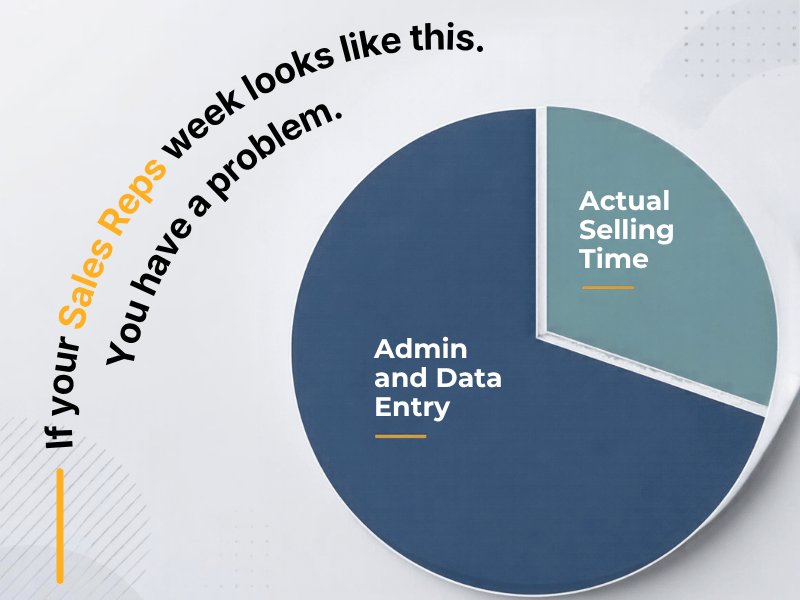
Your reps are not short on leads. They are spending a third of the week on data entry instead of selling, and almost nobody on the leadership team has actually measured it.
I have timed this on real teams, not estimated it from a survey. Manual field updates after a call, duplicate contact cleanup, digging through the account to figure out which record is current, copying notes from email into the CRM two days after the conversation happened. None of that produces a single dollar of pipeline. Add it up across a normal week and you land at 30-40% of a rep's working hours gone to admin.
So before you approve another headcount req or push marketing for more leads, it is worth asking a blunter question. Why are the reps you already have only selling three days a week?
The Math Nobody Runs Before Asking for More Leads
Here is a version of the exercise I ran with a 14-rep SaaS sales team last year. We logged actual hours for two weeks, not self-reported estimates, because self-reported estimates are always wrong in the optimistic direction.
The average rep spent 6.2 hours a week on manual data entry that had nothing to do with a live deal moving forward: updating deal stages by hand because the automation had never been built, re-entering contact info that already existed somewhere else in the CRM, writing call notes into a text field instead of using a structured field that would have fed a report automatically. That is 15% of a 40-hour week gone before you even count the time spent hunting for the right record or reconciling duplicates, which added another 10-12%.
Put a number on it. If a rep's fully loaded cost is 90,000 dollars a year and they are losing 30% of their week to admin, you are paying 27,000 dollars a year per rep for work that produces zero pipeline. On a 14-person team, that is nearly 380,000 dollars a year spent on data entry, not selling.
Nobody budgets for that line item because it never shows up as a line item. It shows up as a pipeline gap that leadership then tries to solve by hiring rep number 15, who will lose the same 30% the moment they onboard onto the same broken process.
Why This Gets Misdiagnosed as a Motivation or Headcount Problem
When pipeline is soft, the instinct is to look at the front of the funnel. More leads, more SDRs, a new outbound sequence. Sometimes that is the right call. Most of the time it is treating a symptom while ignoring the actual bottleneck sitting inside the CRM.
I have sat across from a VP Sales who was convinced her team needed a bigger lead list, right up until we timed how long reps spent manually moving deals between stages because the automation that should have triggered on a form fill had quietly broken eight months earlier and nobody noticed. Nobody noticed because nobody owned the workflow after the initial CRM implementation. The tool went live, everyone moved on to the next priority, and the manual workaround became the permanent process.
This is the part that gets missed constantly at companies without a dedicated RevOps function. The CRM does not stay optimized on its own. Fields get added ad hoc, integrations get bolted on without anyone checking that they still talk to each other correctly, and six months later reps are doing by hand what the system was supposed to do automatically. Nobody redesigned the workflow after the fact, so the manual step just calcified into the job description.
What Actually Moves the Needle, and What Does Not
Buying another tool does not fix this. I have watched companies add a second CRM add-on to solve a problem that was actually caused by the first tool being misconfigured. Now you have two systems that do not talk to each other and a rep spending time reconciling data between them, which is worse than where you started.
What actually works is boring and specific. Map the exact fields a rep touches manually during a normal deal cycle, from lead assignment through close. For each one, ask whether that data already exists somewhere else in the stack, whether it could be populated by a trigger instead of a keystroke, and whether the rep is even the right person to be entering it in the first place.
On one client engagement, we found that 60% of the manual fields reps were updating by hand could be automated using workflows already available in their existing CRM tier. Nobody had built them because nobody had been assigned to own the CRM as a living system rather than a one-time setup project. We rebuilt the deal-stage automation, connected the email tool so notes synced automatically instead of requiring copy-paste, and cleaned up the duplicate contact issue that was eating roughly 90 minutes a week per rep in record-hunting alone.
The team did not get faster because they tried harder. They got faster because the system stopped requiring them to do work a computer should have been doing since the day it was implemented.
Start By Measuring, Not Guessing
Most leadership teams are guessing at this number, and guesses always undercount because reps underreport how much time they lose to friction they have stopped noticing. Time it for real. Pick five reps, track actual hours spent on manual CRM tasks for two weeks, and compare that number to what you assumed going into the exercise. You will probably be wrong, and probably wrong in a way that changes your next hiring decision.
If the number comes back anywhere near 30%, the fix is not another rep or another lead source. It is a workflow audit of the CRM you already have, done by someone who is going to actually redesign the process instead of layering another integration on top of the mess.
If you want a second set of eyes on where your team's week is actually going, that is the kind of audit we run at LangLine Consulting. Reach out and we will walk through what a real time-and-motion study on your CRM would look like.